State, events and steps
This chapter is the centre of the language. Most RCE programs are built from four kinds of declaration:
- a
stateholds data that lasts between events; - an
eventis something that happens, with an optional payload; - a
stepsays how a state changes when an event arrives; - an
erroris a reason to refuse an event.
A door
intent "a door that can be locked only when it is closed"
    "the door starts closed and unlocked"
    example Open, Close, Lock -> locked
    example Open, Lock -> refused: DoorOpen

state Door
    open: bool = false
    locked: bool = false

event Open
event Close
event Lock
event Unlock

error DoorOpen
error Locked

step Door on Open if locked
    fail Locked
step Door on Open
    open = true
step Door on Close
    open = false
step Door on Lock if open
    fail DoorOpen
step Door on Lock
    locked = true
step Door on Unlock
    locked = false
state Doorhas two fields, each with a starting value.- Four events have no payload.
step Door on Open if lockedis a step with a guard. WhenOpenarrives andlockedis true, this step runs andfail Lockedrefuses the event.- When the guard is false, the next step for
Openin the file is used, and it setsopen = true.
For each event, the checker picks the first step, in source order, whose event matches and whose guard is true. If no step matches, the state stays as it was.
Every declared event must have at least one step. Otherwise the step function would have no answer for that event, and the program is refused:
state Counter
    n: u64 = 0

event Inc
event Dec

step Counter on Inc -> n + 1
$ rce check unhandled_event.rce
REFUSED unhandled_event.rce: line 5: W-STEP-2 event `Dec` is handled by no step or actor: δ would not be total
exit status: 1
Inside a step, the state's fields are variables you can read and change. The changes become the new state only if the step finishes without being refused.
Running events
rce run FILE EVENTS applies events one by one and prints the state after
each:
$ rce run door.rce "Open, Close, Lock, Unlock, Open"
0 (initial) Door { open = false, locked = false }
1 Open Door { open = true, locked = false }
2 Close Door { open = false, locked = false }
3 Lock Door { open = false, locked = true }
4 Unlock Door { open = false, locked = false }
5 Open Door { open = true, locked = false }
exit status: 0
A refused event leaves the state unchanged, and nothing after it is applied:
$ rce run door.rce "Lock, Open, Close"
0 (initial) Door { open = false, locked = false }
1 Lock Door { open = false, locked = true }
2 Open refused: Locked
exit status: 1
The exit status is 1 because an event was refused.
The counter again
In the counter from chapter 4, both steps use the short arrow form:
step Counter on Inc -> n + 1
When a state has exactly one field, -> expression sets that field to the
value of the expression. try n.checked_sub(1) else Underflow subtracts
one if the result fits in a u64, and otherwise refuses the event with
Underflow.
$ rce run counter.rce "Inc, Inc, Dec, Dec, Dec"
0 (initial) Counter { n = 0 }
1 Inc Counter { n = 1 }
2 Inc Counter { n = 2 }
3 Dec Counter { n = 1 }
4 Dec Counter { n = 0 }
5 Dec refused: Underflow
exit status: 1
Why build programs this way
A state, a set of events and a step function together form a state machine, which the specification calls the program's Form. Because the step function is a plain function of the old state and the event, a list of events always leads to the same states. You can replay the list and get exactly the same run. Chapter 15 shows the Form itself.
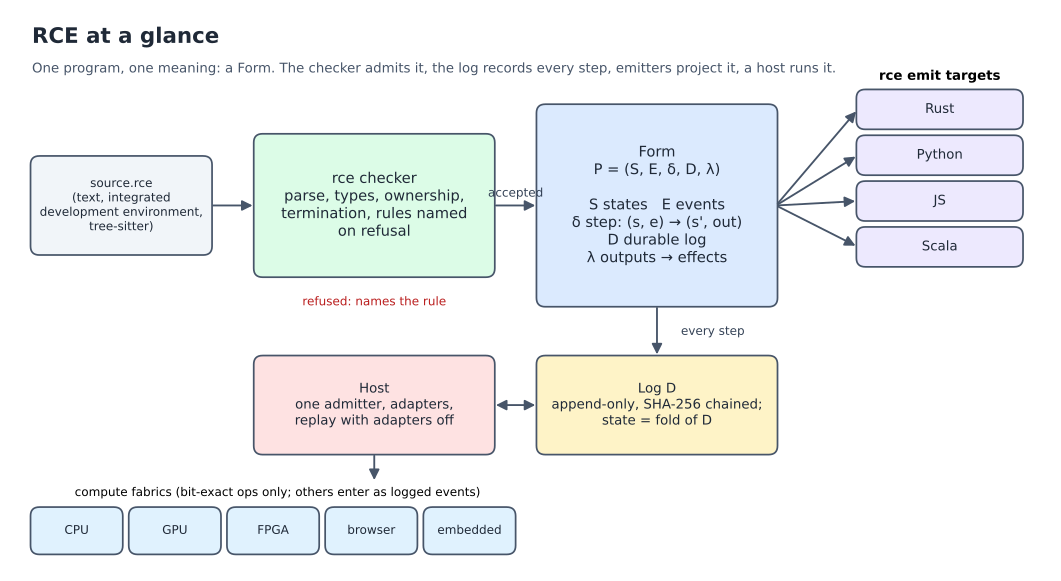
The states, events and steps of this chapter are the S, E and δ of the Form; the log of events is D. More figures: openIE-dev/rce docs/figures.
What you learned
state,event,stepanderror, and how a step is chosen.- Guards with
ifon a step. rce run FILE "Event, Event"to watch a state change.